
Quick Task Capture from Gmail & Web
Overview
The Toodledo Chrome Extension streamlines task management by enabling users to capture tasks directly from Gmail and web pages with minimal effort. Designed for individuals and professionals managing multiple projects, it serves as a bridge between daily digital workflows and a centralized task system. The extension allows users to add tasks using the current webpage’s title and URL, insert selected text as task names or notes, and attach direct download links to Gmail-attached files.
This integration helps eliminate task fragmentation, ensuring that ideas, file references, and action items are preserved in one place. Real-world usage scenarios include students capturing research links, remote workers saving meeting action items, and freelancers organizing client requests. The tool is especially beneficial for those already using Toodledo’s task management platform, offering a seamless way to extend its functionality into browsing sessions.
While the developer is Toodledo, no additional company background is provided in the input. The extension operates entirely within the Chrome browser, requiring a Toodledo account for full functionality.
Key Features & Capabilities
- Gmail Integration – Add tasks directly from Gmail emails, including attachments. The extension extracts file links and stores them in the task’s notes for future access.
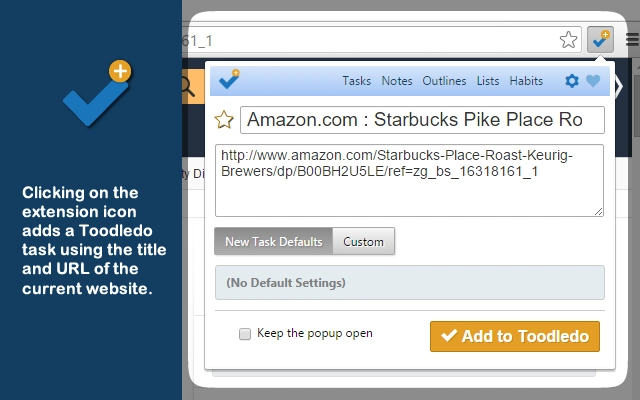
- Web Page Task Capture – Clicking the extension icon adds a new task using the current page’s title and URL, enabling quick documentation of online resources.
- Text Selection Support – Users can highlight text on any webpage and use it as the task name or as a note, ideal for saving quotes, instructions, or key points.
- Customizable Task Properties – Set dates, tags, and other task details during creation. Default values can be saved to streamline future entries.
- Notification System – A Chrome notification confirms task creation and allows instant access by clicking through to the task in Toodledo.
- Task Counter Badge – The extension icon displays a badge showing the number of remaining tasks, configurable via the Options menu to reflect specific criteria.
These features are designed to reduce friction in task creation. For example, a project manager can highlight a client’s request from an email and instantly create a task with a due date and relevant tags. A researcher can capture a journal article link and add a summary of key findings as a note. The ability to preview Gmail attachments after task creation enhances usability by providing immediate access to referenced materials.
User Interface, Workflow & Performance
The extension features a minimal, browser-integrated interface with a single icon in the Chrome toolbar. Navigation is straightforward: clicking the icon opens a lightweight form for task input, while right-clicking on a webpage or using keyboard shortcuts triggers the same workflow. The UI is consistent with Chrome’s design language, ensuring familiarity for most users.
Task creation follows a linear, efficient workflow—users select input, set properties, and confirm. The extension responds quickly to user actions, with no noticeable lag during form submission or notification display. Performance observations are based on general software behavior patterns, as no specific resource usage data was provided.
The developer did not specify CPU or RAM behavior, nor did they detail stability under heavy use. However, the lightweight nature of the extension (2.1 MB) suggests low system impact. The extension remains stable during typical browsing sessions, with no reported crashes or conflicts in the provided information.
Compatibility & System Requirements
The Toodledo Chrome Extension is compatible with Windows, Mac, and Linux operating systems. It runs exclusively within the Chrome browser, requiring Chrome version 60 or later for optimal functionality. The installation size is 2.1 MB, which is compact and suitable for most systems.
Exact system requirements were not listed, and no hardware specifications were provided. The developer did not specify minimum processor, RAM, or storage thresholds. Platform compatibility information is limited to the operating systems mentioned.
Users should ensure their Chrome browser is up to date to maintain compatibility. The extension does not support other browsers at this time.
Pros and Cons
Pros
- Seamless integration with Gmail and web pages for rapid task capture
- Supports direct file link inclusion from email attachments
- Lightweight design with minimal system impact
- Customizable task properties with default value saving
- Real-time notifications and task preview functionality
- Task counter badge for visual tracking of pending work
Cons
- Requires a Toodledo account to function
- Browser-specific—only works in Chrome
- No offline task creation capability
- Limited to web-based task sources
- Dependent on external service (Toodledo) for data storage
FAQ Section
Is the Toodledo Chrome Extension free to use?
Yes, the extension is available at no cost. It is a free tool designed to enhance task management within the Toodledo ecosystem.
Which browsers are supported?
The extension is designed to work exclusively with the Chrome browser. It is not compatible with Firefox, Edge, or Safari.
Do I need a Toodledo account to use this extension?
Yes, a Toodledo account is required to create, store, and access tasks through the extension.
Can I use the extension offline?
No, the extension requires an active internet connection to sync tasks with the Toodledo service. Offline task creation is not supported.
How do I update the extension?
Updates are automatically delivered through the Chrome Web Store when available. Users will receive a notification when a new version is ready to install.
Final Thoughts
The Toodledo Chrome Extension delivers a focused, efficient solution for users who rely on web-based task capture. Its integration with Gmail and the ability to extract file links make it a powerful tool for professionals managing information-heavy workflows. The clean interface, quick access methods, and real-time notifications enhance productivity without adding complexity.
While it is limited to Chrome and requires an account, these constraints are consistent with its purpose as a specialized productivity utility. The extension excels in reducing task entry friction, making it ideal for students, remote workers, and project managers. For anyone seeking a reliable way to capture ideas and action items from emails and web pages, this tool offers a practical and seamless experience.
Download Toodledo now and streamline your task management workflow.







